
If two clients keep asking what is in progress, the fix is a request queue they can see, built in Trello, Notion or ClickUp. Below is the same five-state queue in all three, what the client sees in each, and what each costs for one, three and six people.
Trello is the simplest place to put it: give each client a board, invite them to it, and they can see what is waiting, active and done. Notion suits you if briefs are long documents. ClickUp suits you if you want intake forms and proofing in the same tool and someone on the team will own the configuration. None of them is a client portal. If you need clients to log in to a branded space with files and invoices, read the client portal comparison first.
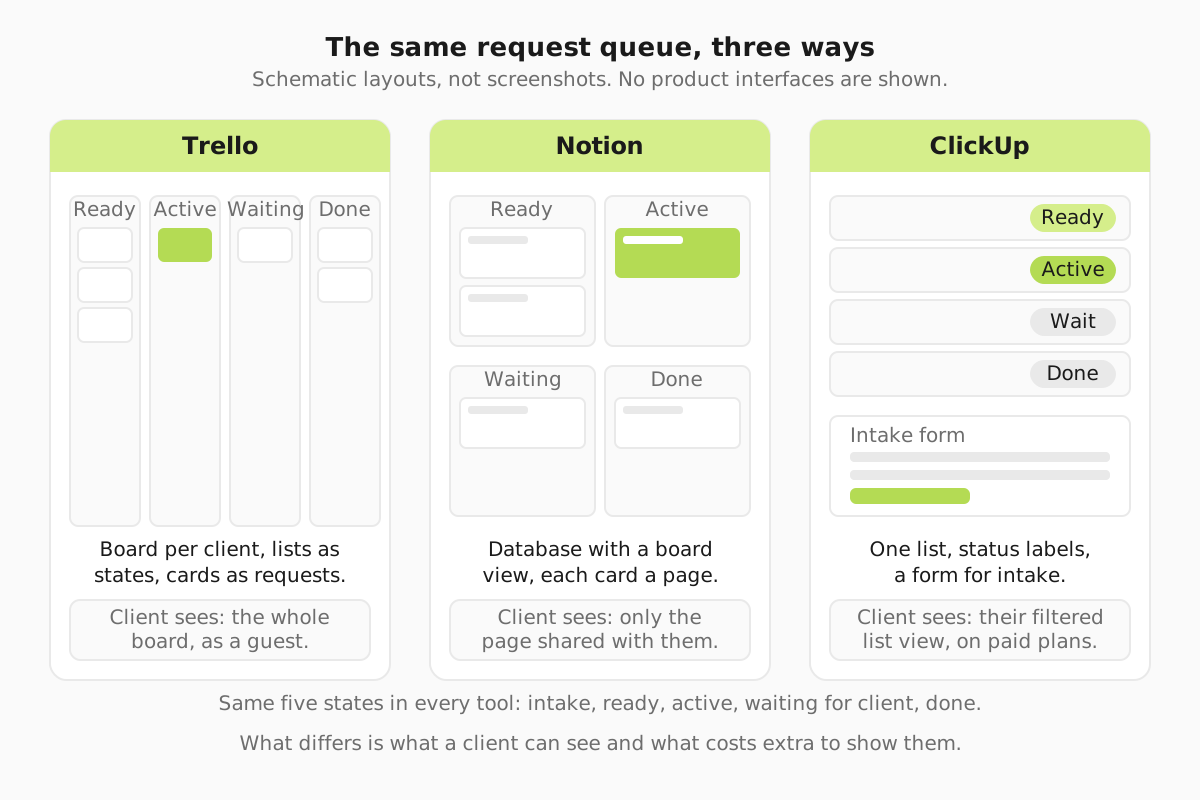
The queue you are building
Every version below builds the same thing. Five states: New (the client has submitted it), Ready (briefed and in line), Active (a designer is on it), Waiting on client (a question or a review is out), and Done. Each client has one request in Active at a time. Each client sees only their own requests, never another client's. The requests and delivery guide explains why the one-active rule holds a subscription together. The job here is narrower: which tool shows that queue to a client without extra software.
In Trello, a board per client
This is the setup with the longest track record. Brett Williams ran DesignJoy on Trello. In his 2021 Indie Hackers AMA he wrote that "clients can only have one active request at a time", with 30+ clients at the time. In a 2022 post he described around 25 customers and a solo shop past $1.5M in annual recurring revenue. One person, one tool, a board each.
Here is how you set it up on a Tuesday morning:
- Create one board per client, named after the client. Keep one internal board for your own team view.
- Add five lists in order: New, Ready, Active, Waiting on client, Done.
- Make a card template with your brief questions: goal, format and sizes, copy, references, deadline, who approves.
- Invite the client to their board only. They add requests as cards in New and drag them into Ready in the order they want.
- Your team moves one card per board into Active. Revisions go in the card's comments, not in Slack.
Where it works. The client sees the whole board, so the "what is in progress?" question answers itself. Clients already know how to drag a card. Standard costs $6 per user a month billed monthly, or $5 billed annually (Trello pricing).
Where it strains. Separation between clients comes from the structure, not a permission rule. A client sees another client's work only if someone invites them to the wrong board, so check invites when you onboard. The Free plan stops at 10 collaborators per Workspace (Trello's pricing page). If each client counts as a collaborator, a six-person studio with five clients has already passed it. Premium costs $12.50 per user a month billed monthly, or $10 annually. It lists unlimited Workspace collaborators, Observers, custom fields and table and calendar views across the Workspace. Trello has no proofing: approvals happen by convention, with the client commenting "approved" before you move the card to Done.
In Notion, a database with a page per client
Notion treats every request as a page, so the brief, the references and the revision notes live inside the request rather than in comments. That suits studios whose briefs run to a page or more: brand work, landing page copy, multi-asset campaigns.
The build: one Requests database with properties for Client, Status (your five states), Designer and Due. Add a board view grouped by Status for the team. Then give each client a page containing a view filtered to their own requests, and share that page with them as a guest. Notion's pricing page says guests are free and limited to the pages they are invited to.
Where it holds up. Long briefs have room. Your process notes, brand guidelines and the request queue sit in one workspace. Plus is €9.50 per member a month billed monthly (about $10.82); the page quotes EUR to us, and the USD figure is our conversion, not Notion's.
Where it strains. Client separation depends on the shared page being set up correctly. A filtered view is only a view. Test with a dummy guest account whether a guest could reach the underlying database before real clients arrive. Clients who live in Slack and email find pages slower than cards. Notion's plan comparison limits blocks on the Free plan once two or more members join. It also lists a 5MB per-file upload limit, which one PDF brand guide will hit. There is no proofing, so approvals are a property the client changes, by convention.
In ClickUp, a list with statuses and a form
ClickUp is the only one of the three whose pricing page lists proofing, and its plan list mentions forms too. That makes it the candidate if you want intake, queue and approvals without adding a second tool.
The build: a Space for client work, one List per client, and custom statuses matching your five states. Put an intake form in front of New so every request arrives with the same fields. Invite each client as a guest to their own List. The pricing page says guests are handled separately with permissions on the paid tiers, so plan on paying for Unlimited before clients log in.
The upside. The form stops half-empty briefs arriving in Slack. Proofing means the client marks up the file where the task lives. Unlimited costs $10 per user a month billed monthly, or $7 billed yearly.
Where it strains. Configuration. Statuses, guest permissions, form fields and views all need deciding, and the client sees whatever the person who set it up chose to show. Budget real time for the build, and expect clients to find the interface busier than a Trello board. The Free Forever plan appeared to allow one form when we read the page, but the wording was unclear. Confirm on ClickUp's plan list before you build around it.
What each costs for one, three and six people
| Tool and tier | 1 person | 3 people | 6 people | Billed annually, per user | How clients are counted |
|---|---|---|---|---|---|
| Trello Standard | $6 | $18 | $36 | $5 | Per user or collaborator on the Workspace; Free is "free for up to 10 collaborators per Workspace" |
| Notion Plus | €9.50 (about $10.82) | €28.50 (about $32.45) | €57.00 (about $64.89) | Not shown as a number; the page says up to 20% savings yearly | Per member; guests free but limited to invited pages |
| ClickUp Unlimited | $10 | $30 | $60 | $7 | Per user; guests handled separately, with permissions on paid tiers |
Take a six-person studio. Trello Standard is $36 a month, ClickUp Unlimited $60, Notion Plus about $65 (all). One client at £2,500 a month (about $3,300) covers any of them many times over. So price does not decide this. What decides it is what the client sees on a Monday morning, and how many hours someone spends keeping the tool tidy. If you are running this alone, the gap is $6 against $10 against about $11 a month.
Trello, Notion or ClickUp: which fits your studio
Pick Trello if clients need to see the board and you are under ten staff. It is the fastest to set up and the easiest for clients. It is also what the best-known one-person subscription ran on. If you are on Trello now and clients keep asking what is in progress, the fix is usually a board per client, not a new tool.
Pick Notion if briefs are long documents, your team already writes its processes there, and clients are comfortable reading pages rather than cards.
Pick ClickUp if you want forms and proofing in one tool and you have someone who will own the configuration. Without that person, it drifts.
How we compare tools is set out in our editorial policy. Run your shortlist through the evaluation and migration worksheet before you move. Then put your brief questions from the request brief template into whichever card, page or form you choose. For the daily routine once the queue exists, read how to manage a design request queue, and for the other tools in the category, see the project management overview.
Asana and Airtable, briefly
Two other tools come up. Asana Starter is $13.49 per user a month billed monthly, or $10.99 annually, and its pricing page says free guest access does not count against your licence count. It is a reasonable fit if your team already uses it internally. Airtable Team is $20 per user a month billed annually. It charges only for people with edit rights, so clients who view a shared link or submit a form are not billed. In the same Indie Hackers AMA, Brett Williams listed Airtable alongside Trello, connected through IFTTT. Both are more tool than a one-request-at-a-time queue needs on day one.