
If a client keeps asking why their five requests are not all moving at once, "one request at a time" is the rule that answers it. Below is how that plays out over a real-looking week. Then the three decisions to write into your policy before your first client pays, and how to price a second active slot.
The rule limits how many things you work on for a client at once, not how much they can send you. A client can drop five requests into your queue on Monday. They wait in an order the client chooses, and the next one starts the moment the current one is delivered.
What the rule limits and what it does not
The rule caps simultaneous work. It does not cap weekly volume. A client who approves a social set on Tuesday morning can have the next card moving by lunchtime. A fast client gets more done in a month than a slow one on the same plan.
That is exactly how the best-known operator words it. DesignJoy's pricing block lists "One request at a time" alongside "Avg. 48 hour delivery" on its Monthly Club at $4,995 a month. In his 2021 Indie Hackers AMA, Brett Williams put it more bluntly: "Clients can only have one active request at a time", managed through Trello.
It is not the only way the market meters work. Two others are worth knowing, because your prospects will have seen them:
- Active workstreams with hours attached. Penji's Essentials plan at $995 a month includes "2 Active Workstreams (Equal to 2-4 hrs daily)".
- Daily output. ManyPixels' Advanced plan at $699 a month includes "1 Daily output".
Of the three, the active-request model is the easiest to explain to a client and, in our view, the hardest to game. It also means your capacity depends on how quickly clients reply, not on how many clients you have. More on that when we get to pricing.
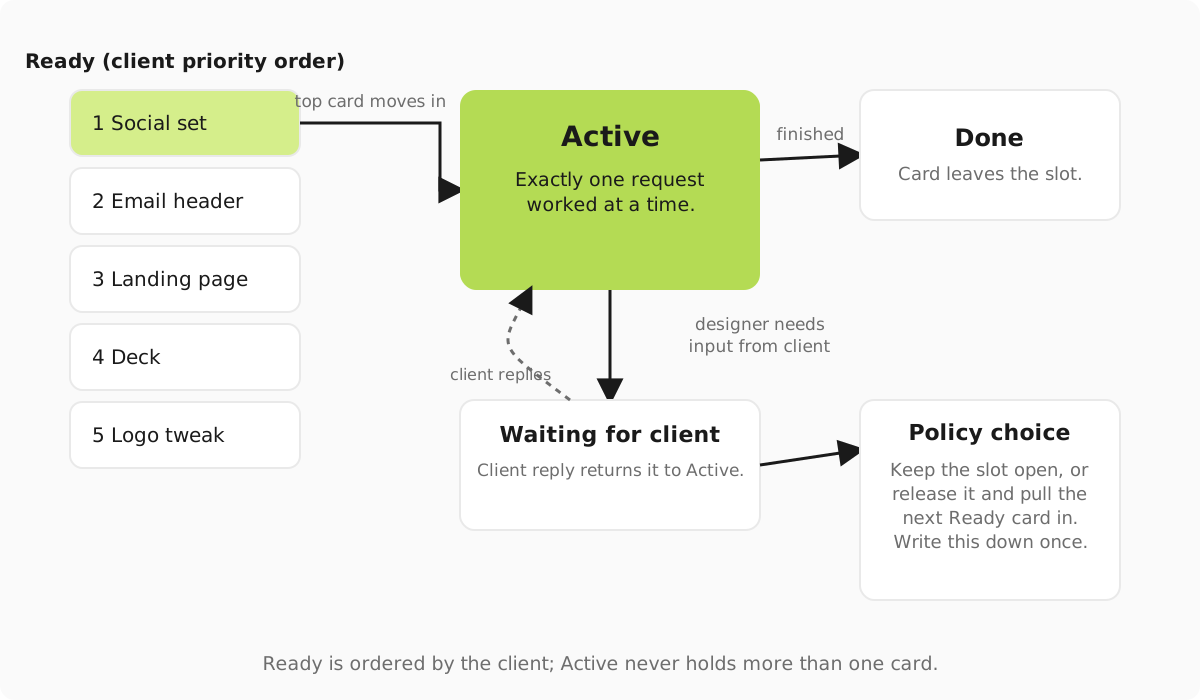
A Monday with five requests
Here is an illustrative week. Say you sell a subscription at $3,995 a month. A client sends five things on Monday morning: a social set for a product launch, an email header, a landing page, a 15-slide sales deck and a small logo tweak. (The icon needs to work at favicon size.)
Before anything moves, you do five things in order:
- Every request lands as its own card in the client's Ready list in Trello. Nothing goes in Active yet.
- You check size. The landing page is too big to deliver as one piece inside your turnaround, so you split it into two cards: wireframe, then visual design.
- You apply your add-on rule. The logo tweak is about 20 minutes, so it rides along with the social set, but only because your written policy allows small add-ons (more on that below). Without that policy it stays a card of its own.
- You ask the client to drag Ready into priority order. They put the landing page first because the launch depends on it.
- The top card moves to Active. Everything else waits, visibly, where the client can see it.
The week then runs like this, with your policy set to release the slot while a delivery waits for feedback:
| Day | Active | Waiting for client | Ready, in client order |
|---|---|---|---|
| Monday | Landing page wireframe | Nothing | Social set with logo tweak, landing page visual, email header, deck |
| Wednesday | Social set with logo tweak | Landing page wireframe, delivered Tuesday | Landing page visual, email header, deck |
| Friday | Landing page visual | Social set, delivered Thursday | Email header, deck |
What happened between Wednesday and Friday: the client approved the wireframe on Thursday with two small comments. The revision went to the top of Ready, got done first thing Friday, and then the visual design took the slot. The email header and deck roll into next week. The client knew that on Monday, because they could see the order.
Now run the same week with the other policy, where a card waiting for feedback keeps the slot. The wireframe sits in Active from Tuesday until the client replies on Thursday. The social set does not start until Thursday afternoon. Your designer has two idle days on this client, and the client gets less done. Neither policy is wrong. You just have to pick one and tell people.
Write these three decisions into your active-request policy
If your clients test the rule every week, it is usually because one of these three was never written down. Put the answers in your onboarding document and your terms before the first invoice goes out.
Does a request waiting for feedback keep the slot?
A card waiting on feedback does not take much time right now, but someone still has to reopen it and re-read the brief when the reply lands. If you release the slot, you do more work per client and need to count those restarts in your weekly hours. If you keep it, you protect your capacity but the client feels slowed down.
A sensible middle: release the slot on delivery, put returned feedback at the top of Ready, and close any card that has waited five working days without a reply. The client can reopen it by moving it back to Ready.
What size is one request?
There is no universal size, so do not borrow one. Define it from your own turnaround. For example: "One request is one deliverable we can get to first review within two working days." List what fits (a social set of up to eight posts, an email header set) and what does not (a full website, a 40-slide deck). The design request brief template gives clients a form that makes size visible before a card reaches Ready.
Are small add-ons allowed?
Say yes or no, and put a limit on yes. A workable line: "Changes under 30 minutes to an existing asset can ride along with the active request, one per request." That covers the logo tweak on Monday. Without a limit, add-ons turn one request into three and the rule stops meaning anything.
When one request is too big
Split a request when its first version cannot reach review inside your turnaround. Split at a point where the client has something real to react to, never at an arbitrary hour count. Common split points: by stage (wireframe, then visual), by batch (slides 1 to 15, then 16 to 30), or by channel (social, then email, then ads). Splitting a landing page by stage means the client approves structure before you spend hours on polish. Split a deck by batch once the first batch has set the style.
Do the split in the open, on Monday, and tell the client why. Splitting quietly after the work starts looks like you are stretching the queue. The guide to managing a design request queue covers what to do when a split card jumps priority mid-week.
Selling a second active request
A second slot does not add a little work. It roughly doubles the client's demand on your week. The worked table in the capacity and profitability guide starts from 26 production hours a week and an average request of 4 hours, which gives 6.5 requests a week. At one delivered request per client per week, one designer carries 6 clients. At two, the same designer carries about 3.
So price the second slot from the room it takes. Using the illustrative $3,995 plan: six one-slot clients bring in $23,970 a month. Three two-slot clients need to bring in the same, which is $7,990 each, or $3,995 for the second slot. You might knock something off because a two-slot client means one onboarding, one set of brand files and one set of calls. But sell a second slot for only a few hundred dollars more and you are paying the client to take your capacity.
Do not sell a second slot just because your software lets you add one. Sell it when a client keeps a full Ready list and approves fast, so the first slot is never the bottleneck on their side. The guide to service design and pricing covers how to tier plans around this, and what design subscriptions charge shows where your numbers sit against the market.
How to explain it to a client in two sentences
For the sales page:
Send as many requests as you like and put them in the order you want. We work on one at a time, deliver it, and start the next one straight away.
For onboarding, add your policy in plain words:
While a delivery waits for your feedback, we move on to your next request. Your feedback goes to the top of the list when it arrives. Anything larger than one deliverable we can get to review in two working days gets split, and we will tell you where the split is before we start.
Put the same wording in the description of the Ready list on the client's Trello board. If you invite clients to their boards, watch the collaborator cap. Trello's pricing puts the Free plan at up to 10 collaborators per Workspace. Standard is $5 per user a month billed annually, or $6 billed monthly. For the full board setup, from intake through handover, work through the requests and delivery guide. Keep the workflow and approval checklist open while you set it up.