
If a client pauses or cancels mid-request, with a landing page or brand pass half done, they keep what you have already approved. The days they already paid for go where your written policy says: banked, used up, or held for a fee. Below are the three pause policies studios use, what happens to the active request and the files under each, and two replies you can adapt today.
Pause and cancel are different promises
A pause says: stop the work, stop the billing, and keep my place. A cancel says: finish what I paid for, then we are done. Clients use the two words loosely, so your first job is to find out which one they mean.
Here is what each one should cover in your terms:
- What stops. On a pause, new work stops and so does the next charge. On a cancel, only the next charge stops. The current period runs out.
- What continues. On a pause, the client usually keeps board access and can still add requests to the queue. On a cancel, work carries on until the paid period ends.
- What the client keeps. Approved files are theirs in both cases. The open question is the half-finished request, which gets its own section below.
Most studios advertise both. DesignJoy lists "Pause or cancel anytime" on its $4,995 a month Monthly Club (designjoy.co). Its page does not publish how pause days are counted, so we do not describe its mechanics here. That gap is common. The promise sells well and the detail gets written the first time a client asks.
Three ways to handle a pause
Take one illustrative case. Dana charges £3,000 a month on a 30-day billing period. On day 12, a client asks to pause. Their landing page is at first review: the layout is approved, the visual pass is half done. There are 18 paid days left, worth about £1,800 at £100 a day.
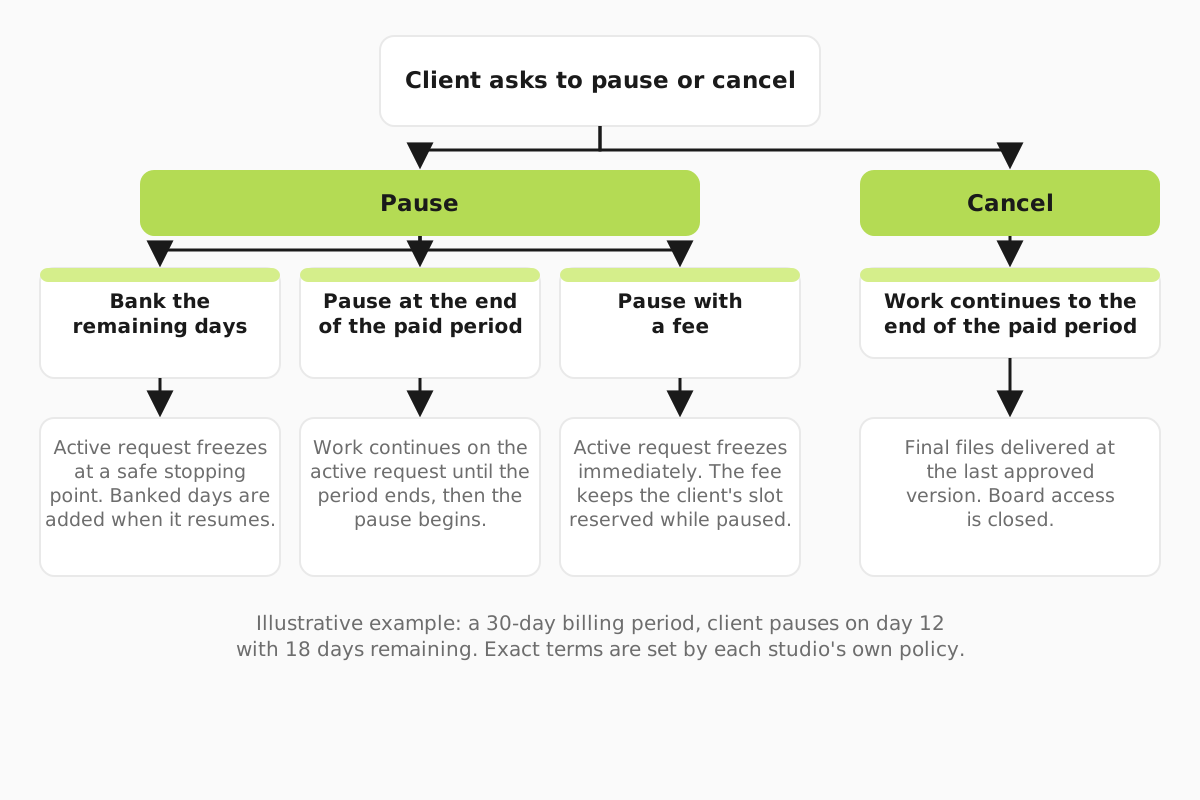
Option A: bank the remaining days. The pause starts on day 12. You freeze the landing page at a safe stopping point and record 18 days owed. When the client comes back, they get 18 days of service before the next charge. The client loves this. You now hold £1,800 of cash you have not earned yet, and your designer has a hole in their week that another client has to fill.
Option B: pause at the end of the paid period. The client asks on day 12, but the pause starts on day 31. You keep working on the landing page for 18 more days, so it is probably finished before the pause begins. Nothing is owed and nothing carries over. Your cash is clean and the designer's schedule does not change this month. The cost is that some clients feel they paid for days they did not want.
Option C: pause with a fee. The pause starts now, the request freezes, and the client pays a small monthly amount to keep their slot. Say £150 a month in this example. The fee is not there to make money. It stops a paused client from holding a slot for free while a waiting client could fill it. Decide whether the 18 unused days are banked on top of the fee or lost. Write it down either way.
| Policy | When the pause starts | The landing page | Days owed on return | Your cash and schedule |
|---|---|---|---|---|
| A: bank the days | Day 12 | Frozen at first review | 18 days | £1,800 held but unearned; a gap in the designer's week |
| B: pause at period end | Day 31 | Worked on until day 30, likely delivered | None | Nothing owed; schedule unchanged this month |
| C: pause with a fee | Day 12 | Frozen at first review | As your policy states | £150 a month keeps the slot paid for |
If you are just starting out, Option B is the easiest to run and to explain. Option A suits studios with a waitlist, because a banked slot can be lent to someone else. Option C suits studios where a paused client blocks real revenue.
Whatever you choose, your billing tool has to be able to do it. Stripe Billing, which many studios run subscriptions on, costs 0.7% of billing volume on pay as you go in the UK. A one-year contract starts from £450 a month (about $596) (Stripe UK pricing). On Dana's £3,000 client, 0.7% is £21 a month. Before a pause policy goes live, run it once on a dummy customer in your own account and note exactly what happens to the next charge date. Do not write a promise the tool cannot keep.
What happens to the half-finished request
A frozen request needs to be restartable by anyone, weeks later, without a call. That means stopping at a safe point, not mid-thought. For the landing page, the safe point is the approved layout plus the visual pass saved as a named version, even if it is rough.
Here is what to do on the day the pause starts:
- Save the working file as a named version, for example "LP v2, paused day 12". Put the link on the card.
- Write a three-line note on the Trello card: what is approved, what is in progress, what comes next.
- Move the card from Active to a Paused list. Do not leave it in Active, where it blocks the slot and confuses everyone.
- Add the restart owner and the expected return date to the card. If the client gave no date, put the date you will check in.
- Record the days owed, or the fee, in your billing notes so the next invoice matches what you told the client.
A Paused list on Trello costs nothing extra. The Free plan covers up to 10 collaborators per Workspace. Standard is $5 per user a month billed annually, or $6 billed monthly (Trello pricing).
Now decide what happens to the slot. If you give it to another client, tell the paused client that on return they rejoin the queue, and say roughly how long that takes. The unsafe option is to release the slot while silently promising immediate resumption. When the client comes back, their card goes to the top of Ready, not straight into Active, and you check the brief still holds. Our guide to the one active request rule covers how the Ready and Active lists work together.
When the client cancels
A cancel is simpler, as long as you have decided three things in advance. Make cancellation and final handoff clear even when the client is leaving. A tidy exit is the one they talk about to other founders.
The final period. In our suggested terms, work continues until the paid period ends. If Dana's client cancels on day 12, the designer keeps working on the landing page until day 30. No charge follows.
The files. On day 30, the client gets every approved file, plus the active request as it stands at its last approved version. For the landing page, that is the approved layout. Whether they also get the unapproved working file is your call. Some studios hand it over marked "work in progress"; others keep it. Either is fine if it is written down before the first cancel.
Board access. Close the board, or switch it to read-only, on a stated date. Give the client a folder link with their files first, so closing the board never feels like taking their work away. The workflow and approval checklist has a handoff section you can copy for this.
A message you can send
Reply the same day. Keep it short, confirm the dates, and say what happens to the work. Two examples, written for Option B:
Hi Sam, no problem, your pause is set. You are paid up to 30 October, so we will keep going on the landing page until then and aim to have it delivered before the pause starts. From 31 October there are no charges and the board stays open, so you can add requests whenever you like. When you are ready to restart, reply here and we will pick up from the top of your queue within two working days.
Hi Sam, your cancellation is confirmed and there will be no further charges. We will keep working until 30 October, the end of your paid month. On that day you will get a folder with every approved file, including the landing page at its latest approved version. The board closes on 6 November, so download anything you want before then. Thanks for working with us.
Swap the dates and the request name. If you run Option A, replace the first two sentences of the pause reply with the number of days banked and the date the next charge will fall.
Put it in your terms before the first client asks
You want this settled before the first payment, not after the first awkward email. Add one paragraph for pause and one for cancel to your terms. Then check your sales page, your onboarding email and your billing settings all say the same thing.
A pause paragraph needs: when the pause starts, what happens to paid days, whether there is a fee, what happens to the active request, and how restart works. A cancel paragraph needs: the notice period, the final day of work, which files are handed over, and when board access ends. Our billing and retention guide covers failed payments and restarts, and the billing and subscriptions software page compares the tools that have to carry out whichever policy you write.
Refund and consumer-law rules vary by country, so get advice from a local lawyer or accountant before these terms go live.